Your risk determines the size
Choose a fixed dollar amount or a percentage of the account size you enter. The indicator calculates and rounds down the contract size using the stop distance and commissions.
Set entry, stop-loss and take-profit directly on your chart. Risk Manager calculates the contract size for your maximum risk, including commissions, micro-contract conversion and automatic take-profit based on R:R.
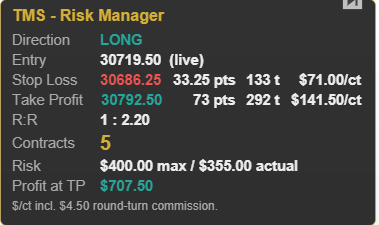
Choose a fixed dollar amount or a percentage of the account size you enter. The indicator calculates and rounds down the contract size using the stop distance and commissions.
In Live mode, entry follows the current price. In Fixed mode, you set your own entry level. With an open position, the Live entry can stay at the fill price.
A micro equivalent is calculated automatically for NQ, ES, YM, RTY, GC and CL. Automatic take-profit draws the target at your selected R:R; you can also set it manually.
Direction, entry, stop, target, R:R, contracts, micro equivalent, actual risk and potential profit at take-profit. Table position, colors and font size are configurable.
Drag existing lines to move them. All shortcuts are configurable. Levels are saved with the chart and reset when you change instruments.
Copy the TMS-RiskManager.dll indicator file into the relevant folder and restart the platform. The indicator then appears under “TMS Indicators”. Settings are in English.
%AppData%\ATAS\Indicators%AppData%\ATAS X\Indicators8 pages covering calculations, controls, settings and practical tips. PDF in German.
Download PDFTrading financial instruments involves substantial risk and can result in the loss of the capital invested. The content is provided for educational and informational purposes only and is not investment advice. Past performance is not a reliable indicator of future results. Risk Manager is a calculation and display indicator. It does not place orders.